
Category Archives: BPU++
Fuel pumps testing
Fuel Pumps
Testing
This is a chart showing the
result of the fuel pump tests
Also
chart available in .PDF format
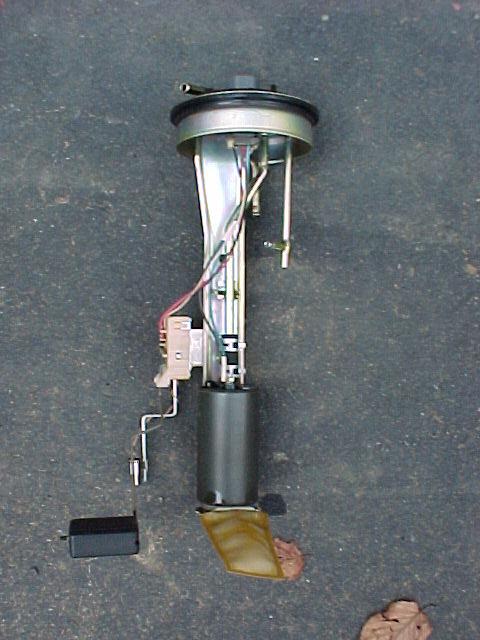
Here is a shot of the dual
Walbro pumps mounted on the intank
hangar. You can see the tee where the two pumps come together, and the
braided line from the tee going to the stock pump outlet.
Different view
“DualPumps”.
A shot of the top of the fuel
pump access hatch showing the banjo
fitting and -6an line going to the rail.
Dual Walbro pumps (note small
pump size), Stock MKIII pump (same
size as MKIV pump), and Python pump (unpainted). The Python pump was
pathetic, I didn’t even include it on the flow chart.
Different view of
“Pumps”
Comments/suggestions? Email
me

Fuel control(afc,sfc,vpc/gcc & more)
| HKS Super AFR |
|
|
|
|
| Apexi AFC Fuel Controller |
|
 
|
|

|
|
|
|
|
|
Fields |
|
|
SFC Hyper-R |
|

|
|
|
Greddy |
|
|
Rebic IV 
|
|
|
HKS |
|
VPC
|
|
VPC
|
|

|
|

|
|

|
|
|
Fuel |
|
|
Stock Pump
Stock Fuel Rail Twin in Tank Stock
Paxton Fuel System
HKS Fuel Rail
|
|
|
Fuel |
|

|

|

|

|

|

|

|

|

|

|

|

|

|

|

|

|

|

|

|

|

|

|

|

|

|

|

|

|

|

|

|

|

|

|

|

|

|
|


![DCP_0454[1].jpg (39892 bytes)](DCP_0454%5B1%5D.jpg)




![720cc-everything4bad-ass-fuel-system[1].jpg (66819 bytes)](720cc-everything4bad-ass-fuel-system%5B1%5D.jpg)


Apexi afc install instructions
A’PEXi
S-AFC Installation
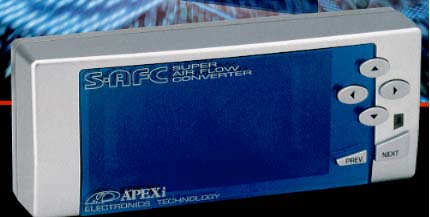


Concept:
Entry-level fuel computer designed to modify the air flow meter signal.
Also
can be used instead of the GCC for finer control of your VPC.Characteristics:
Easy to read VFD display, unparalleled list of functions
Comments:
The second generation SUPER AFC follows the highly successful SUPER AFC in an
upgraded package. The SUPER AFC is a vehicle specific fuel computer that
modifies the air flow meter signal/ pressure sensor signal and allows the user
to either richen or lean the fuel mixture. Adjustment ranges from +/- 50%. The
Super AFC boasts an 8-point adjustable fuel curve with 500 RPM increment
setting points. The Super AFC also allows the user to adjust fuel enrichment
according to either LO/HI throttle positions. The AFC also cures the erratic
idle problems associated with open atmosphere blow off valves on hot-wire air
flow meter equipped vehicles. MONITOR MODE shows analog meter faces, Y graph
display, Numerical display, Peak Hold, Replay Mode, 1 point/10 point and ghost
map tracing. All correction factors are also displayed in percentages.
Here is
what you will need:–
S-AFC wiring harness and head
unit–
10mm socket–
Wire crimpers–
Butt connectors
and the supplied connectors
Lets
get started!1.Remove the negative
battery cable.
2.Remove the wiring harness
from the ECU.
3.Refer to the ECU diagram.

- Splice
the Green
Wire (RPM) into 58.- Splice
the Gray
Wire (Throttle) into 43.- Cut
wire 66 in half, leave yourself enough room to connect a wire to ECU harness.- Connect
the Yellow
wire to the 66 wire connected TO the ECU harness.- Connect
the White
wire to the 66 wire heading AWAY from the ECU harness.- Splice
the Brown wire (ground 1) into 69,
close to the ecu.- Splice
the Black wire (ground 2) into 69 at least 1cm away from the Brown
wire.- Splice
the Red wire (12V+) in to ECU wire 31.- Pink
and Orange
wires are not used.OK,
Now you have all of the wiring done, double check all of your
connections, reconnect the wiring harness
to your ECU. Make sure all of
those wires are still tight. Plug the harness into the S-AFC.
Reconnect your battery cable. Turn the ignition to the ON position.
The AFC should boot up and display A’PEXi, if screen did not light
up, stop disconnect the battery and find out what went wrong.
Most likely it is power or ground problem (or a loose ecu harness.)
If the
unit Powers On, follow these steps:First
start off by Resetting the AFC.
Many have often complained that their AFC does not show full
throttle(%100), regardless if
it is brand new. Go under [etc.] and
press NEXT~>. Confirm “YES” when prompted “Init.
All?” and
press NEXT again, Now turn the ignition OFF and then back ON, and the unit
should now be reset and ready.Next
enter the following basic settings:-Go to [main]
~>[setting] ~> [3. TH-Point] ~>
[Lo-94, Hi-95]-Go to [main] ~>[etc.]
~> [1. Sensor Type] ~> [1.
Hot-Wire] ~> [in-12, Out-12] ~> [in-1, Out-1]-Go to [main] ~>[etc.]
~> [2. Car Select] ~> [Cyl:6, Thr: UP]-Go to [main] ~>[etc.]
~> [3. Graph scale] ~> [Ne = 7000rpm][Ne-POINT = 3500, 4000,
4500, 5000, 5500, 6000, 6500, 7000][Dec. -Air = NOT USED, unless you
want to use it to compensate for venting your BOV to atmosphere]Do not modify the low
throttle settings. While at low throttle (in closed loop mode) the ecu
will counteract any changes made and over time your long term fuel map will be
modified. I recommend modifying your high
throttle fuel curve on the dyno with an air/fuel ratio meter & egt gauge
installed. For maximum power, one
probably wants to run an air to fuel ratio of between 11:1 (rich) and 12.5:1
(lean) Do
yourself a favor and pay a professional to tune it. If you lean your
engine out, things can melt.
Blue wire
mod info:
This allows you to read Oxygen
Sensor Voltage on the AFC display. On the wiring harness for the AFC the blue wire
is not normally used. The blue wire is meant for
the second Mass Air Flow Meter on a Nissan 300ZX. You will connect this wire
to the O2 sensor wire right at the ECU.
To read the O2 sensor voltage, scroll down to and select the “etc.”
menu. Select the “Sensor Check”. Of the three readings, O2 voltage
will be the middle one (#2).
VPC+AFC
If you are installing the VPC with
the AFC, then install the AFC on the output wire of VPC

Apexi afc install instructions
A’PEXi
S-AFC Installation
Concept:
Entry-level fuel computer designed to modify the air flow meter signal.
Also
can be used instead of the GCC for finer control of your VPC.Characteristics:
Easy to read VFD display, unparalleled list of functions
Comments:
The second generation SUPER AFC follows the highly successful SUPER AFC in an
upgraded package. The SUPER AFC is a vehicle specific fuel computer that
modifies the air flow meter signal/ pressure sensor signal and allows the user
to either richen or lean the fuel mixture. Adjustment ranges from +/- 50%. The
Super AFC boasts an 8-point adjustable fuel curve with 500 RPM increment
setting points. The Super AFC also allows the user to adjust fuel enrichment
according to either LO/HI throttle positions. The AFC also cures the erratic
idle problems associated with open atmosphere blow off valves on hot-wire air
flow meter equipped vehicles. MONITOR MODE shows analog meter faces, Y graph
display, Numerical display, Peak Hold, Replay Mode, 1 point/10 point and ghost
map tracing. All correction factors are also displayed in percentages.
Here is
what you will need:–
S-AFC wiring harness and head
unit–
10mm socket–
Wire crimpers–
Butt connectors
and the supplied connectors
Lets
get started!1.Remove the negative
battery cable.
2.Remove the wiring harness
from the ECU.
3.Refer to the ECU diagram.
- Splice
the Green
Wire (RPM) into 58.- Splice
the Gray
Wire (Throttle) into 43.- Cut
wire 66 in half, leave yourself enough room to connect a wire to ECU harness.- Connect
the Yellow
wire to the 66 wire connected TO the ECU harness.- Connect
the White
wire to the 66 wire heading AWAY from the ECU harness.- Splice
the Brown wire (ground 1) into 69,
close to the ecu.- Splice
the Black wire (ground 2) into 69 at least 1cm away from the Brown
wire.- Splice
the Red wire (12V+) in to ECU wire 31.- Pink
and Orange
wires are not used.OK,
Now you have all of the wiring done, double check all of your
connections, reconnect the wiring harness
to your ECU. Make sure all of
those wires are still tight. Plug the harness into the S-AFC.
Reconnect your battery cable. Turn the ignition to the ON position.
The AFC should boot up and display A’PEXi, if screen did not light
up, stop disconnect the battery and find out what went wrong.
Most likely it is power or ground problem (or a loose ecu harness.)
If the
unit Powers On, follow these steps:First
start off by Resetting the AFC.
Many have often complained that their AFC does not show full
throttle(%100), regardless if
it is brand new. Go under [etc.] and
press NEXT~>. Confirm “YES” when prompted “Init.
All?” and
press NEXT again, Now turn the ignition OFF and then back ON, and the unit
should now be reset and ready.Next
enter the following basic settings:-Go to [main]
~>[setting] ~> [3. TH-Point] ~>
[Lo-94, Hi-95]-Go to [main] ~>[etc.]
~> [1. Sensor Type] ~> [1.
Hot-Wire] ~> [in-12, Out-12] ~> [in-1, Out-1]-Go to [main] ~>[etc.]
~> [2. Car Select] ~> [Cyl:6, Thr: UP]-Go to [main] ~>[etc.]
~> [3. Graph scale] ~> [Ne = 7000rpm][Ne-POINT = 3500, 4000,
4500, 5000, 5500, 6000, 6500, 7000][Dec. -Air = NOT USED, unless you
want to use it to compensate for venting your BOV to atmosphere]Do not modify the low
throttle settings. While at low throttle (in closed loop mode) the ecu
will counteract any changes made and over time your long term fuel map will be
modified. I recommend modifying your high
throttle fuel curve on the dyno with an air/fuel ratio meter & egt gauge
installed. For maximum power, one
probably wants to run an air to fuel ratio of between 11:1 (rich) and 12.5:1
(lean) Do
yourself a favor and pay a professional to tune it. If you lean your
engine out, things can melt.
Blue wire
mod info:
This allows you to read Oxygen
Sensor Voltage on the AFC display. On the wiring harness for the AFC the blue wire
is not normally used. The blue wire is meant for
the second Mass Air Flow Meter on a Nissan 300ZX. You will connect this wire
to the O2 sensor wire right at the ECU.
To read the O2 sensor voltage, scroll down to and select the “etc.”
menu. Select the “Sensor Check”. Of the three readings, O2 voltage
will be the middle one (#2).
VPC+AFC
If you are installing the VPC with
the AFC, then install the AFC on the output wire of VPC





Greddy e-manage fuel controller install
E-manage Install
on 1993-1998 Supra Twin Turbo
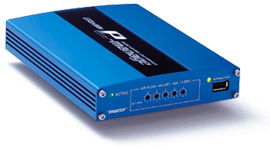
Shortcuts:
-
(1) –
Installing the MAF, RPM, Throttle, Power & Ground Wires -
(2) –
Installing the
Injector Wires into the E-manage
Main Harness -
(3) –
Installing the E-manage Injector Wires into the
ECU Harness -
(4) –
Installing the Ignition Wires into the E-manage Ignition
Harness -
(5) –
Installing the E-manage Ignition Wires into the
ECU Harness
(1)
–
Installing the MAF, RPM, Throttle, Power & Ground Wires
1. Remove the negative
battery cable.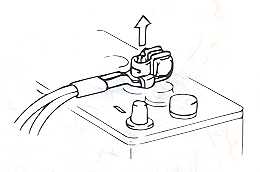
2. Remove the wiring harness
from the ECU.

3. Refer to the ECU diagram.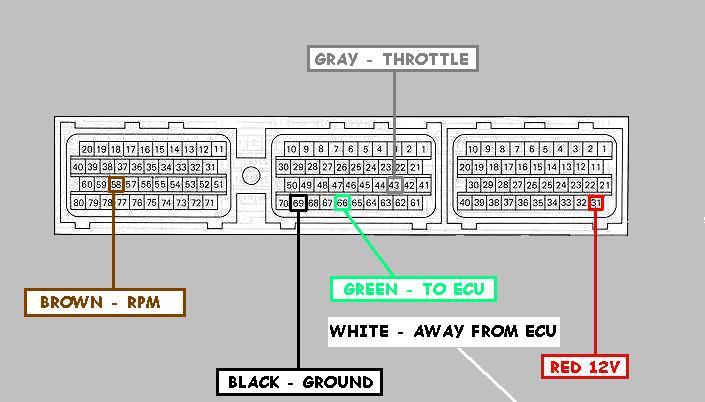
-
Splice the
BROWN
Wire (RPM) into 58. -
Splice the
Gray
Wire (Throttle) into 43. -
Cut wire 66 in half,
leave yourself enough room to connect a wire to ECU harness. -
Connect the
GREEN
wire to the 66 wire connected TO the ECU harness. -
Connect the
White
wire to the 66 wire heading AWAY from the ECU harness. -
Splice the
Black
wire (Ground) into 69. -
Splice the
Red wire (12V+) in to wire 31.
OK, Now you have all of the
main wiring
done, double check all of your connections,
reconnect the wiring harness to your ECU. Make
sure all of those wires are still tight.
Reconnect your negative battery cable. Turn the ignition to the ON position. The
E-manage
should light up.
(2) –
Installing the
Injector & Sub-Injector Wires into the E-manage
Main Harness
-
Install the injector wires into the
main harness as shown below.
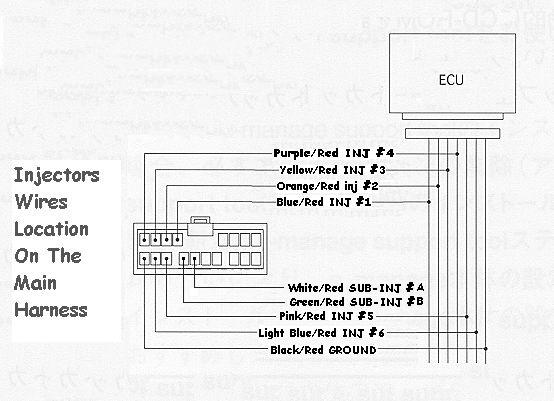
-
It should look like this in the
end (without the Sub-Injector wires),


-
It should look like this in the
end (with the Sub-Injector wires),


(3) –
Installing the
E-manage Injector Wires into the
ECU Harness
1. Remove the negative
battery cable.
2. Remove the wiring harness
from the ECU.
3. Refer to the ECU diagram below.
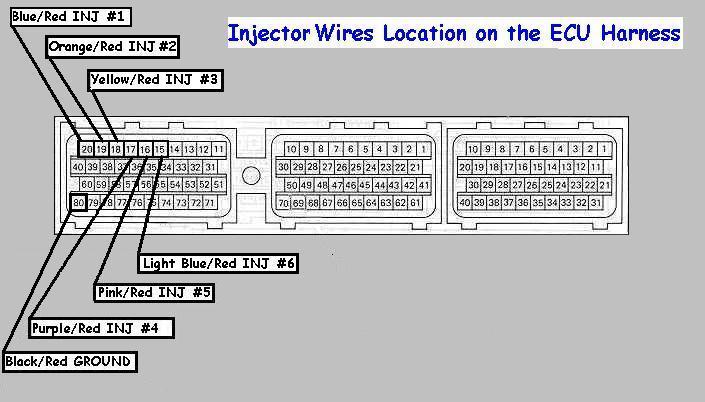
-
Splice the
BLUE/Red
(INJ#1) into 20. -
Splice the
Orange/Red
Wire (INJ#2) into 19. -
Splice the
Yellow/Red
Wire (INJ#3) into 18. -
Splice the
Purple/Red
Wire (INJ#4) into 17. -
Splice the
Pink/Red
Wire (INJ#5) into 16. -
Splice the
Light Blue/Red
Wire (INJ#6) into 15. - Splice the
Black/Red
wire (INJ Ground) into 80.
(4) –
Installing the
Ignition Wires into the E-manage Ignition
Harness
-
Install the ignition wires into the
main harness as shown below.
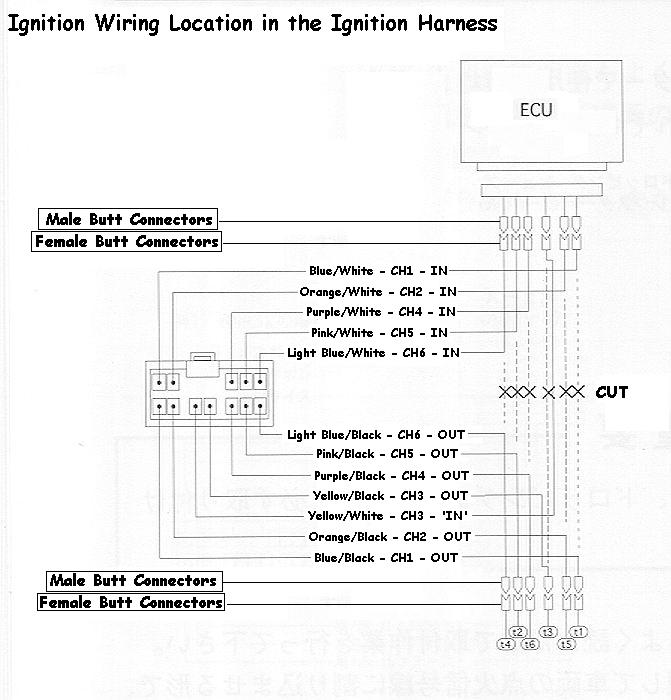
- It should look like this in the end,


- Install FEMALE BUTT connectors on ALL the WHITE
marked wires. - Install MALE BUTT connectors on ALL the BLACK
marked wires.


(5) –
Installing the
E-manage Ignition Wires into the
ECU Harness
1.Remove the negative
battery cable.
2.Remove the wiring harness
from the ECU.
3.Refer to the ECU diagram below.
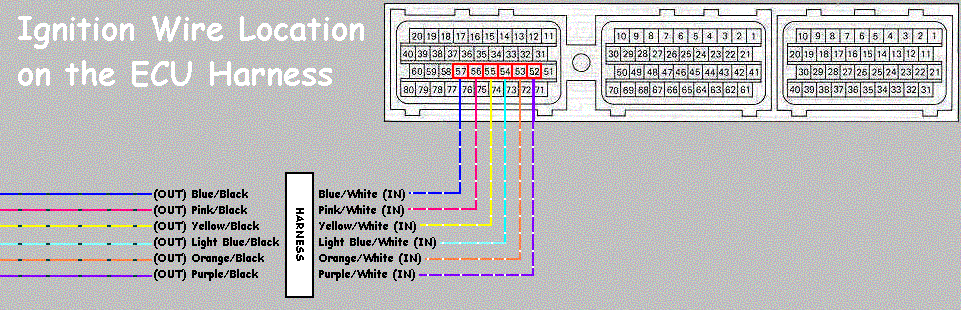
- Cut wires 57,56,55,54,53,52 on the ECU harness.
- Install MALE BUTT connectors on ALL the wires
coming from the ECU harness. - Install FEMALE BUTT connectors on ALL the
wires that been cut away from the ECU. - Start plugging the Male Connectors into the Female
as shown in step
4 above.
(6) – Setting the Knobs
inside the E-manage
- Remove the E-manage circuit bored from the E-manage
box,
- Take off the 4 Allen screws from the front panel
with the Allen tool supplied. - Remove two bottom Philip screws.

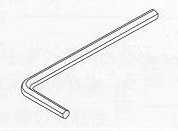
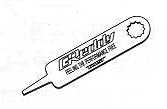
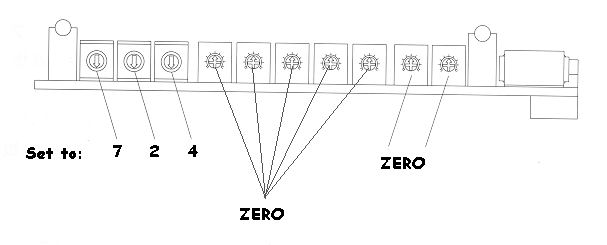
- Using the supplied Greddy tool, Set the knobs on the Left to 7,2,4, and the rest to
zero’s. - 7 = Direct ignition
- 2 = Hotwire
- 4 = Toyota Hotwire
TY_HW-5 (Toyota Hotwire Type-5)
(7) – Jumper Setting

Here are all the wires installed on the
Field’s
Harness (If you are using one).


